Sheet 01 · Multilingual product pages and product films
Found without a part number
An industrial component catalog can only be read by someone who already knows the part number.
Overseas engineers search by what the job needs: load, stroke, pressure. They get the matching series, the exact order code, and its drawing and spec sheet, in their own language. The inquiry reaches your sales team already specified.
Your catalog, opening on the film
Only your customers
know your part numbers
Industrial components are bought by part number, and catalogs are built for people who already know one. A part that cannot be found in the buyer’s language is left out of the design, and you never hear about it.
Putting the PDF on a website with a search box changes nothing, because a value inside a PDF can’t be filtered by spec, calculated or switched to another language.
Without the series name or the part number, there is nothing to type into the search box.
A code assembled by hand from the how-to-order table is only confirmed when the quote comes back.
Dimensions sit in a table and the shape in an image that blurs when zoomed, matched by eye.
Each distributor translates separately, so the values are hard to check against the original.
It starts from the job
not from the part number
A buyer finds, configures and requests a quote without waiting on your engineers. The film shows how the product actually moves.
Find by spec
Enter what the job needs, such as load, stroke and pressure, and each series that fits comes back at its smallest size, with the order code, length and weight.
Find by code
Search reads partial codes and typos, and an order code pasted from a drawing or a parts list is decoded position by position.
Get the exact code
Pick a code and its drawing dimensions, spec sheet, length and weight follow.
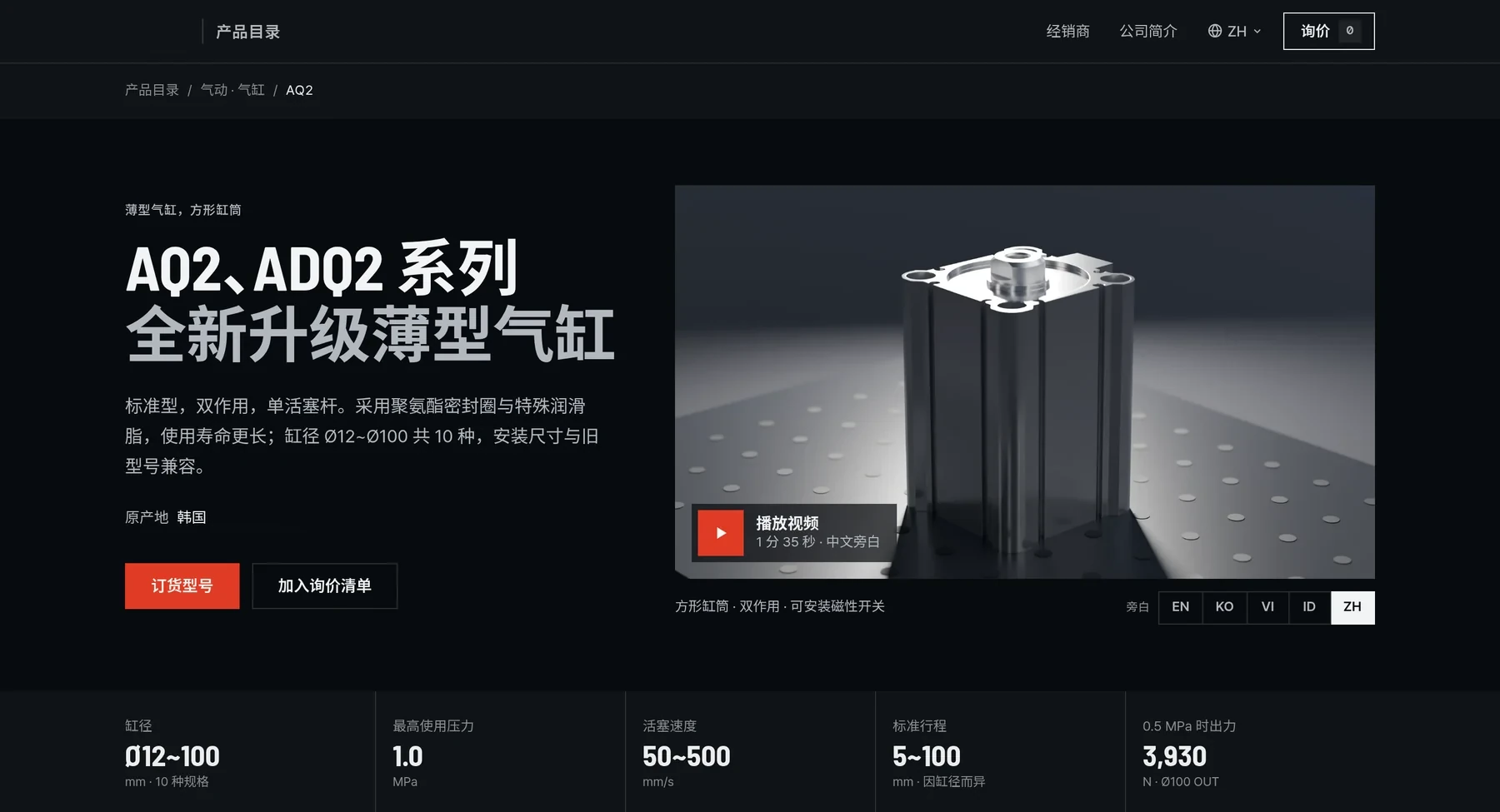
English, Korean, Vietnamese, Indonesian and Chinese on the same film
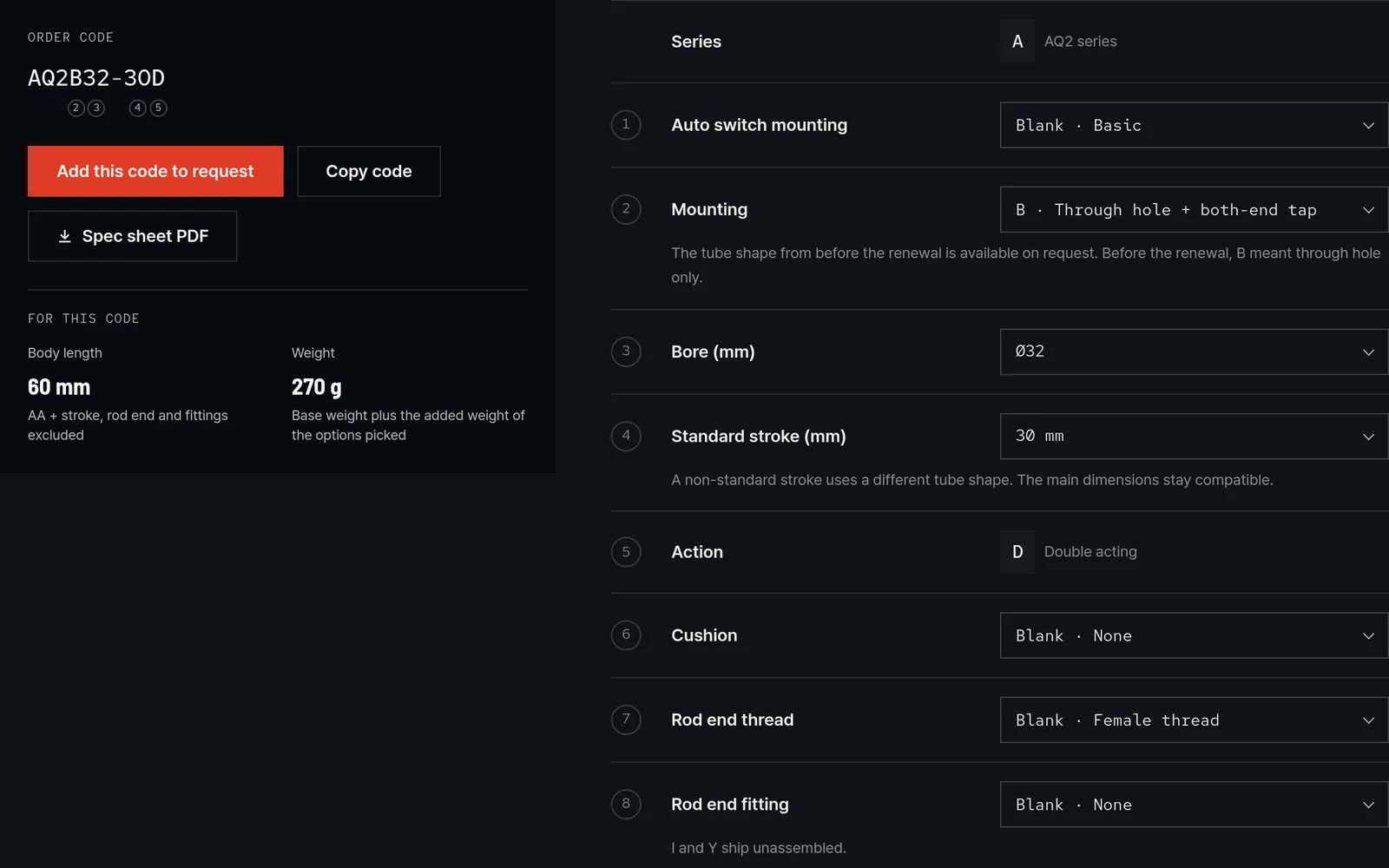
Each choice fills its place in the code, with body length and weight for that exact code
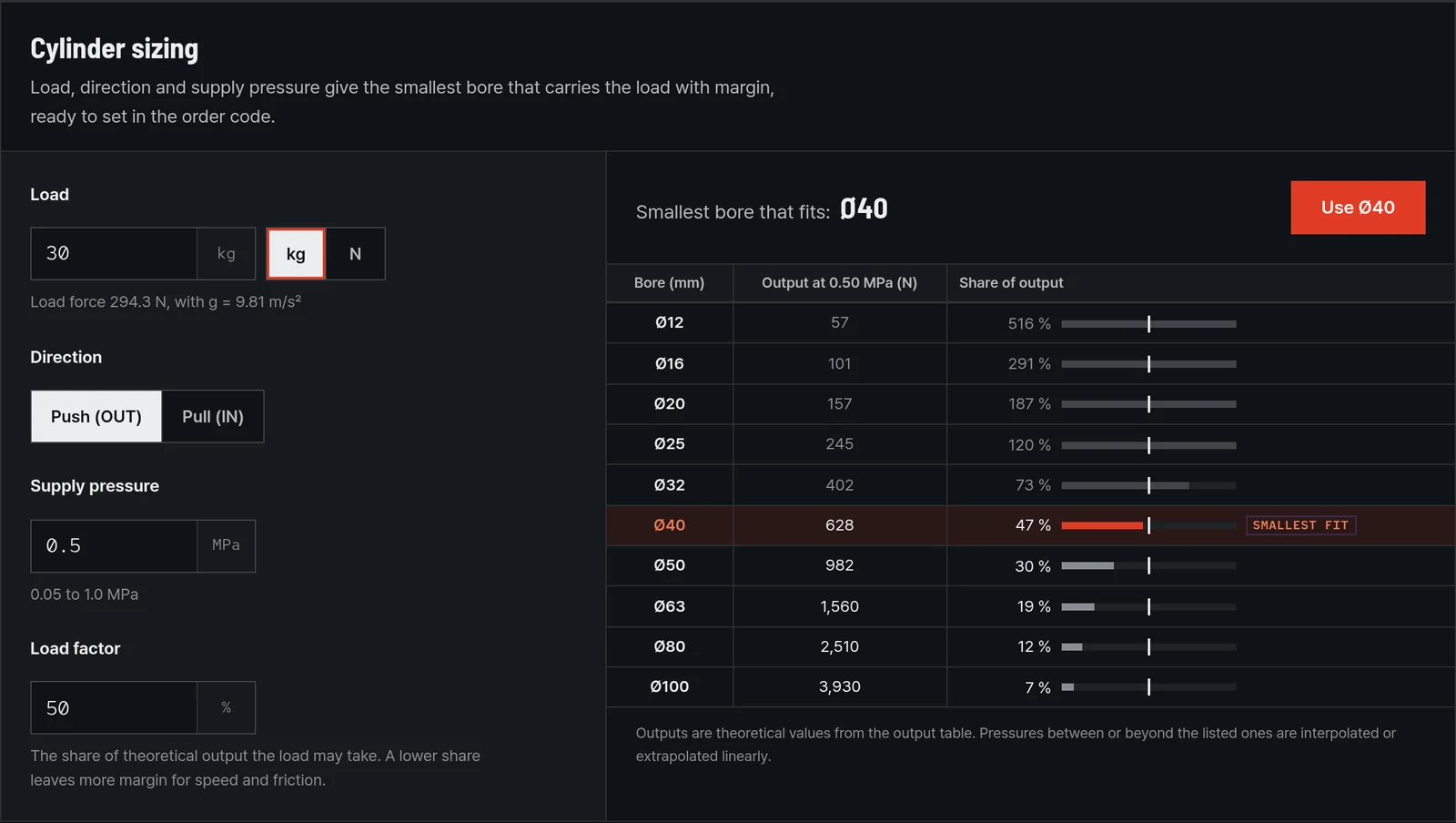
Load, direction and pressure return the smallest bore with margin, one click into the code
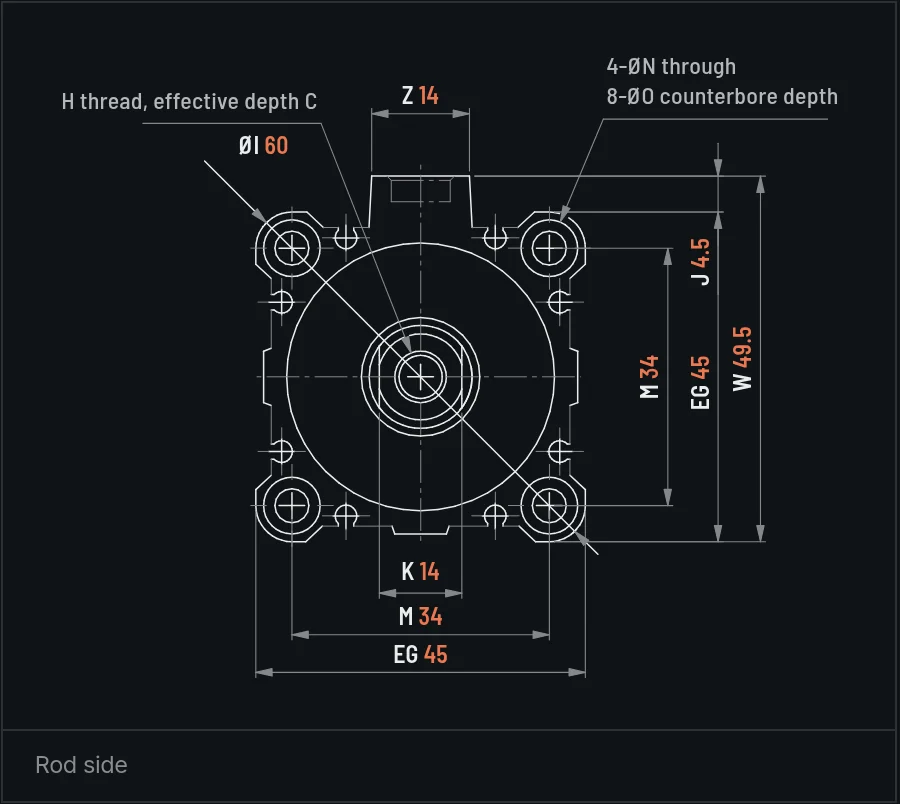
Sharp at any zoom, with the dimensions of the size picked
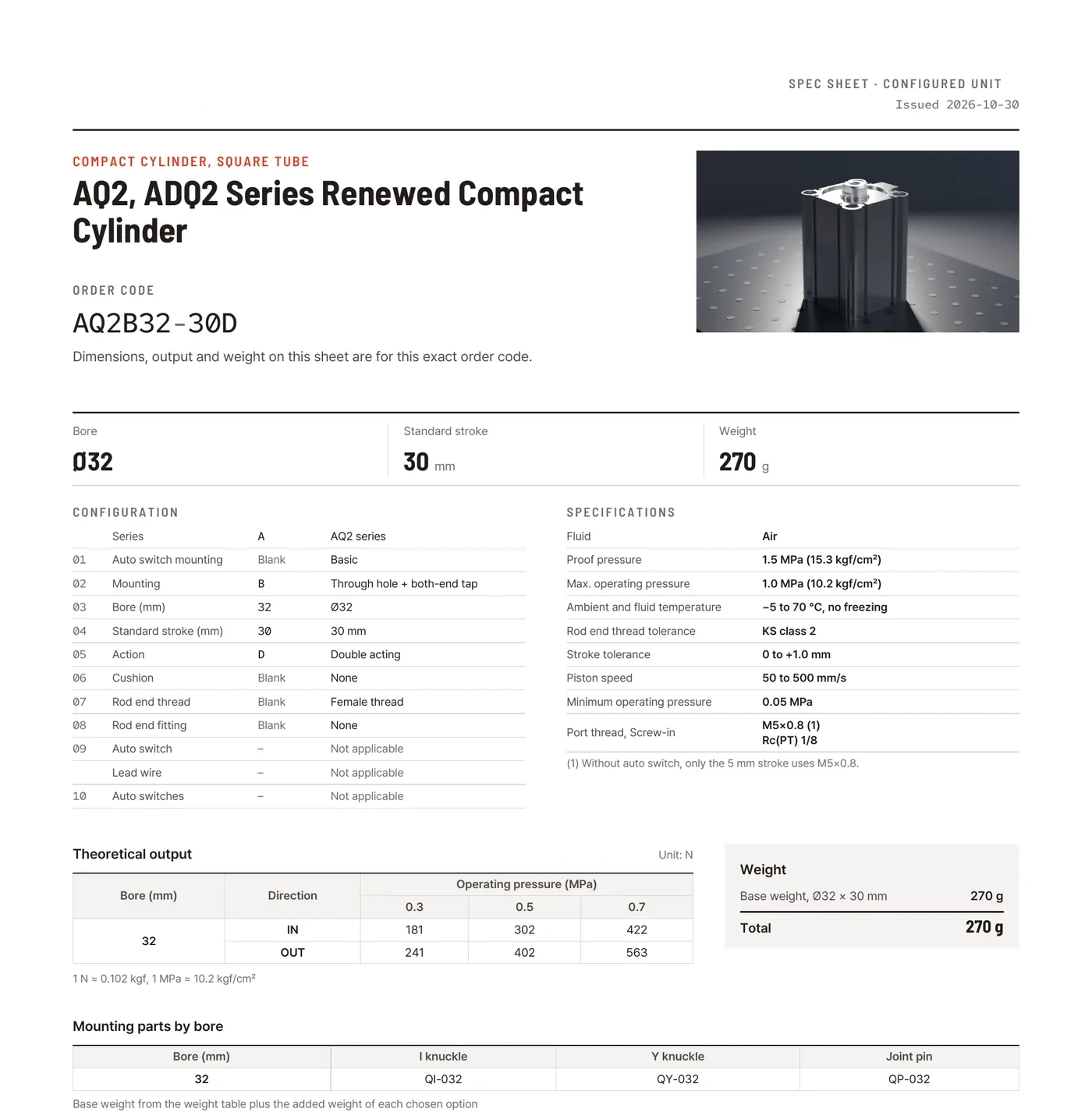
A PDF for the configured unit, issued in the buyer’s language
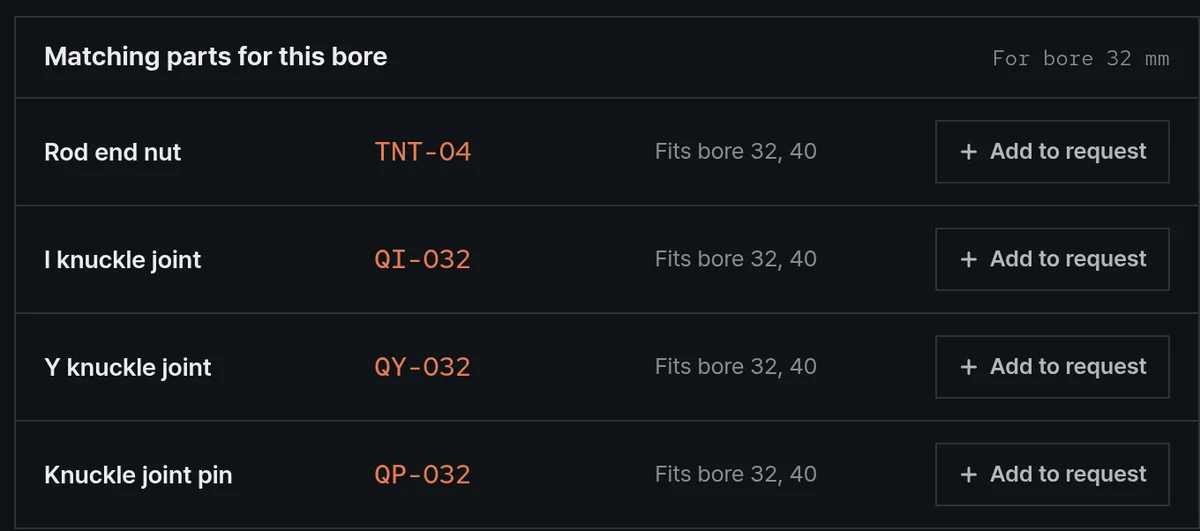
Nut, knuckles and pin that fit the bore, added to the request in one click
Need CAD generated for the exact order code? That is bringCAD.
See bringCAD →Matched first
Translated second
Search, order codes and drawings can only be trusted when every value beneath them agrees. Where two disagree, nothing is guessed: each difference comes back with its page and both values, so your engineers decide instead of searching.
Even in a language nobody on your team reads, the values are the ones your engineers confirmed.
Every value on a page has been checked against your own documents.
Nothing is guessed. Your engineers decide.
Pages in every language come from the one confirmed record.
Product films
rendered from your own CAD
Every product page opens on its film. Each film ships as a campaign package: masters in the languages you need, email HTML, a deck, thumbnails, stills and posting copy.
Need one film, not a catalog? That is bringFrame.
See bringFrame →Watch the work
All films produced for one industrial-automation manufacturer
Three films from the catalog, chosen for what they prove: the film that puts X, Y and rotation in one stack, the film where a dust-proof cover keeps particles out of the drive, and the film that sets a micro cylinder’s service life against the standard unit. The rest play in the catalog above, and the full films are shown on a call.
Approved by the engineers
who designed the parts
The hardest reviewer a product film can face is the engineer who drew the product. Every film on this page went through that review before the client published it.
“개발부서 확인하였고 영상 만족도가 높습니다.”
“The development department has reviewed the films. Satisfaction is high.”
Sales Planning Team · industrial-automation manufacturer
After the development department’s review of the PLS series films ·
“퀄리티가 너무 좋습니다!”
“The quality is excellent!”
Same team ·
“매우 만족합니다.”
“We are very satisfied.”
Same team ·
The client’s own development departmentEvery film is checked by the engineers before release. Their sign-off is the acceptance bar.
On the client’s official channel, in both languagesEN and KO masters of each film are posted under their name, not ours. Thirty-five were delivered, thirty-one of them on the customer’s channel today.
Embedded in their product pagesThe films now sit next to the catalog entries they were built from.
Not a 3D shop’s turntable
A typical 3D film stops at importing the CAD, rotating it and adding a logo. A bringCatalog film is held to a development department’s standard: what is on screen matches the product.
Reads as a photograph
Machined surfaces and edges catch the light the way they do in product photography.
Moves like the real mechanism
Every stroke ends at the stop your CAD defines, and nothing appears that isn’t in your CAD.
Checked before release
Every figure on screen is checked against the datasheet before the film ships.
- Landscape and portrait cuts come from the same master.
- Your CAD and datasheets never leave the project.
One film, every channel
Most studios deliver a video file. Each bringCatalog film ships with the whole distribution stack around it, in the languages you need, built from the same checked CAD, so your team publishes without briefing another agency.
A broadcast master per languageEach master carries native narration in its language at 1080p and is mastered to the broadcast loudness standard.
MP4 per language · −14 LUFSEmail campaign, ready to sendOne HTML file carries every hero image. Paste it into your mail tool and send it.
1 × HTMLCampaign deck in each languageThe deck runs eight sections matched one to one with the film, from the hero and scene cards to the order-code guide, video card and contact. Each section comes as an image, with one overview sheet for the whole.
8 + 1 imagesThumbnails for every surfaceYou get YouTube thumbnails in each language, a text-free version for your own copy, and square tiles sized for your web catalog.
per languageStill libraryEvery key angle comes as a clean high-resolution render with no text baked in. As technically exact product photography, it works in any language.
dozens per filmPublishing copy, paste-readyThe package includes the YouTube title and description in each language and a LinkedIn post to match, in executive voice.
per languageAnnotated manifestEvery file is listed in your team’s language with what it is for and where it goes, so the package needs no follow-up call.
1 × guideTwo PLS110A stages are bolted face to face with no adapter plate, making a 48 mm stack that moves in a plane. The upper axis rides the lower one, so every position is the sum of the two.
Three steps
To start
Send the files
It starts with your catalog PDF, your datasheets and the CAD you have. There is nothing new to prepare.
Matched and confirmed
The items that need a decision come back to you page by page, and production starts from the record your engineers confirm.
Review and launch
Product pages and films go live after your engineers review them, and new products and new languages are added on the same record.
Which market
Do you want to open first?
We skip the pitch decks. Bring one catalog and leave with the scope for your first market and your first product line.
Your CAD and datasheets never leave the project. Every page and film is checked against them before it goes live.
bringCatalog is built for industrial manufacturers whose products are sold on their specifications.
Every film is checked against your documents before it ships.
Founder & CEO
Former robotics company President
20 yrs Korea & US market experience